
Disputes and staff alerts
Applies to: Whop Payments and Whop Checkout
When a buyer opens a case in Whop's Resolution Center (a place inside Whop where a buyer can raise a problem with a payment) or their bank or card issuer files a dispute (a chargeback, where the card network reverses a payment while it looks into it), the module leaves a private, staff-only note on the client's record in WHMCS and can alert your staff by email. Handling the case itself, evidence, deadlines and the outcome, all stays in Whop.
Where you see it
- A sticky note the module adds to the client's record in the admin area. It shows on the client's summary, on their Notes tab, and on tickets they open. It is for staff only: the customer never sees it, and the module never emails the customer about it.
- A staff email, if you set up a WHMCS Notifications rule for it (see below).
- The case itself, in the Resolution Center or the disputes list inside the Whop dashboard.
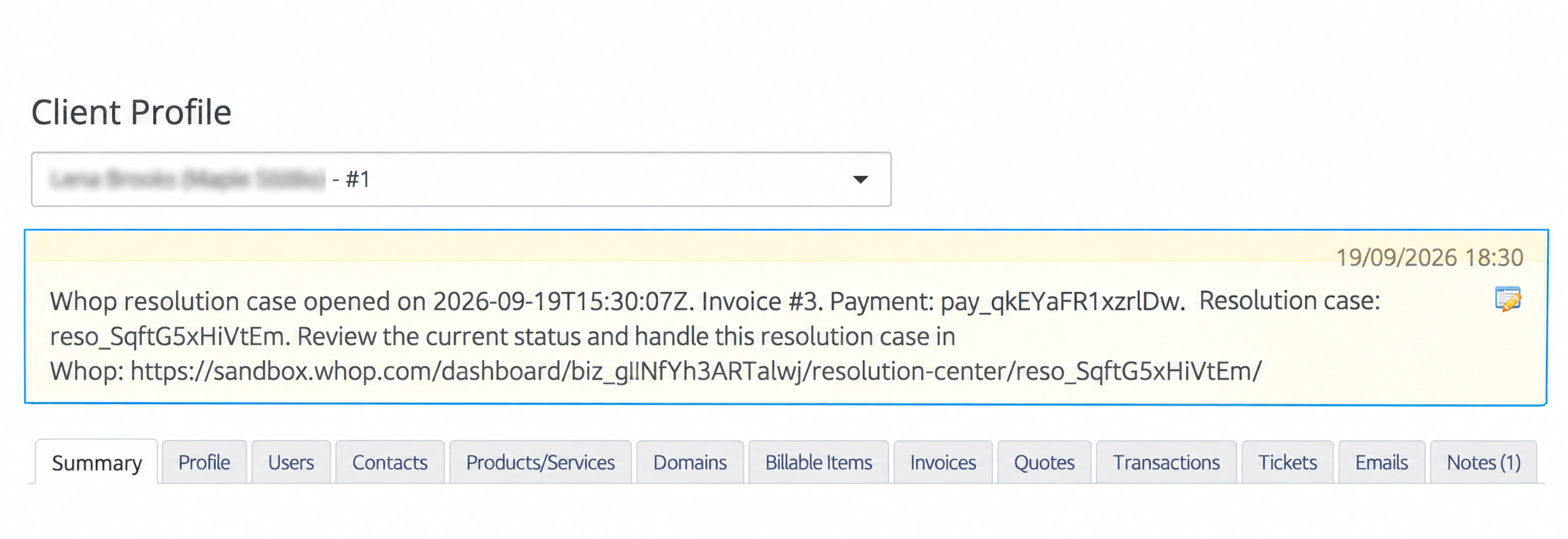
Sandbox: opening a Resolution Center case creates a staff-only sticky note with the invoice and payment references.
What happens
The module matches the Whop payment to exactly one WHMCS transaction, and through it to one invoice and client, then does two things, once each: it adds the sticky note, and it fires the notification event for your staff alert.
The note names the invoice, the Whop payment reference, whether it is a dispute or a Resolution Center case (with that case's own reference), and gives a link straight to it in Whop. The module writes exactly one note per case and permanently records that it did, so even if Whop reports the same case twice you will not see it twice. If the payment cannot be matched to exactly one WHMCS transaction, no note and no alert are created at all.
What to expect
The note stays on the client's record until a member of staff removes its sticky flag by hand. Nothing about it changes automatically, because WHMCS does not track whether the case is still open.
Evidence, deadlines, the outcome and the money all stay in Whop. The module never submits evidence, never responds to a case, and never reverses the original payment because a case opened.
Whop can also refund a case automatically, under thresholds you set in Whop's own refund policy, before any staff member sees it. That refund syncs back to WHMCS the same way any refund does. See Refunds for how that looks on the invoice.
Set up the staff alerts
Without these steps, the module has nothing to send: it never creates a notification rule for you.
- In the WHMCS admin area, open System Settings > Notifications (older versions show Setup > Notifications).
- Enable a notification provider, normally Email, and confirm it can deliver to your staff.
- Click Create New Notification Rule.
- Set the event category to API and the event to Custom API Trigger.
- Add the condition Trigger Identifier, operator Exact Match, and enter
whop.dispute.created. - Choose Default Notification Message, pick the recipients, and save the rule enabled.
- Repeat steps 3 to 6 for
whop.resolution_center_case.created. - Optionally repeat once more for
whop.refund.failed, the alert for a refund that WHMCS already recorded and Whop later failed or canceled. See Refunds.
Create one rule per identifier. Multiple matching rules, or the same recipient added twice, produce multiple emails for a single case, even though the module only ever fires one event.
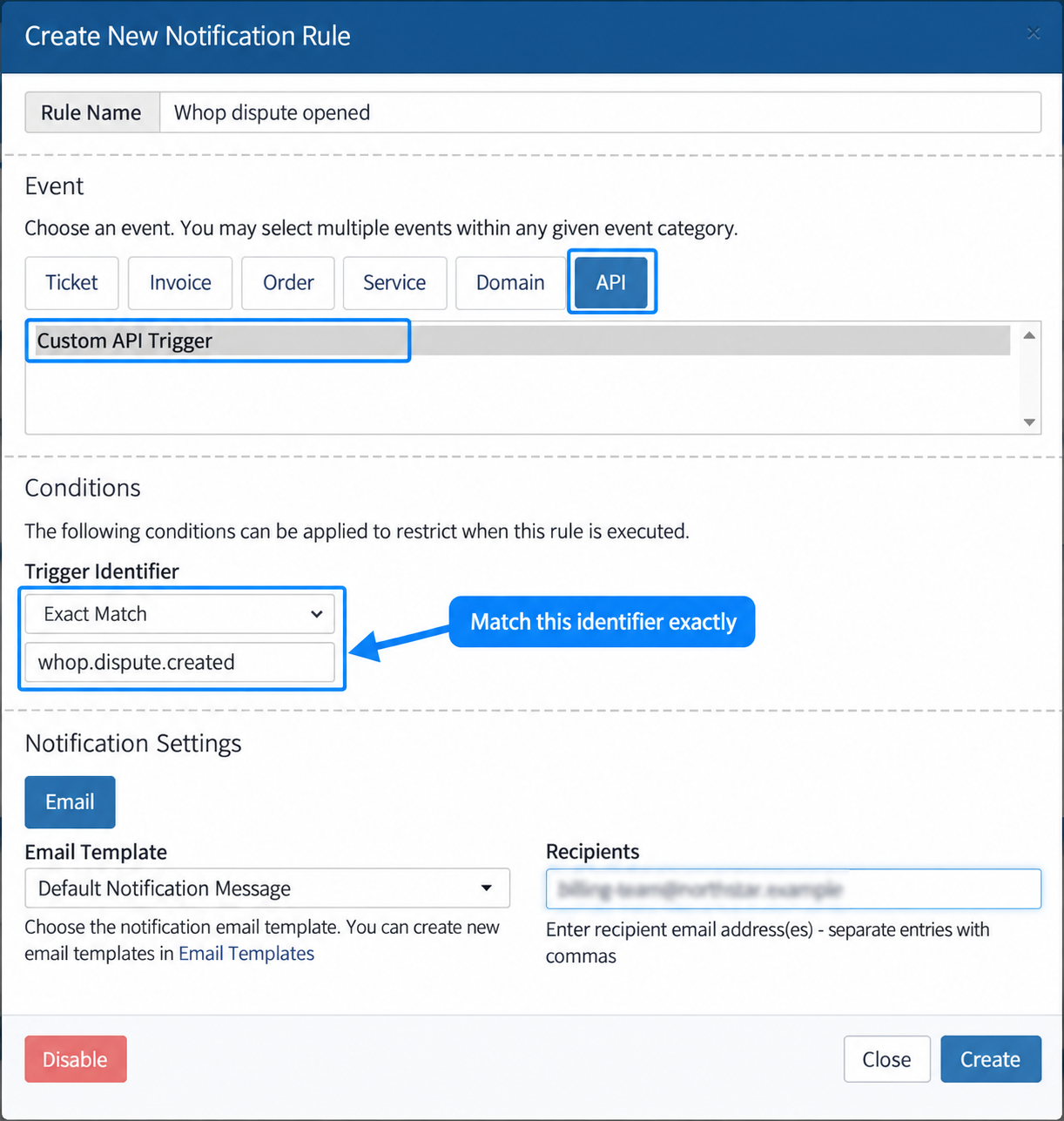
WHMCS: match Custom API Trigger to the exact identifier and choose the notification template and staff recipients.
Check delivery
After creating a rule, confirm two things separately.
First, that the module did its part. The sticky note on the client's record is that confirmation. A Whop payment notice entry in Billing > Gateway Log appears only when something went wrong, so read it when the note is missing.
Second, that the email itself arrived. WHMCS's Default Notification Message template gives every one of these emails the same subject line, "Notification Message", so do not search your inbox for the word "dispute". Open the email: the body carries the real title, such as "Whop resolution case opened", as a clickable link to Whop.
WHMCS accepting the event is not proof that an email reached anyone. If nothing arrives, check that the rule's identifier is typed exactly, that the recipients are correct, and that your notification provider can actually deliver.
Settings involved
- The WHMCS Notifications rule for
whop.dispute.created. - The WHMCS Notifications rule for
whop.resolution_center_case.created. - The WHMCS Notifications rule for
whop.refund.failed, optional, covered in Refunds. - An enabled notification provider, normally Email.
None of these are gateway settings. See the full list on Settings reference.
Related: Refunds, Troubleshooting, Balances, payouts and transactions.
Updated 16 days ago