
Refunds
Applies to: Whop Payments and Whop Checkout
Refund a Whop payment the same way you refund any WHMCS payment: from the invoice's own Refund tab. WHMCS does the same work whichever direction the refund starts. If a member of staff issues it from Whop's own dashboard instead, or Whop refunds a case automatically, WHMCS notices and records it too, so both systems keep agreeing on what was returned.
Where you see it
- The Refund tab on a paid invoice, where you request a refund.
- The refund's own row in Billing > Transactions, with a reference starting
rf_. This is Whop's ID for that refund, separate from thepay_ID of the original payment. - On WHMCS 9, a credit note that WHMCS creates alongside the refund, as part of its own accounting for that invoice.
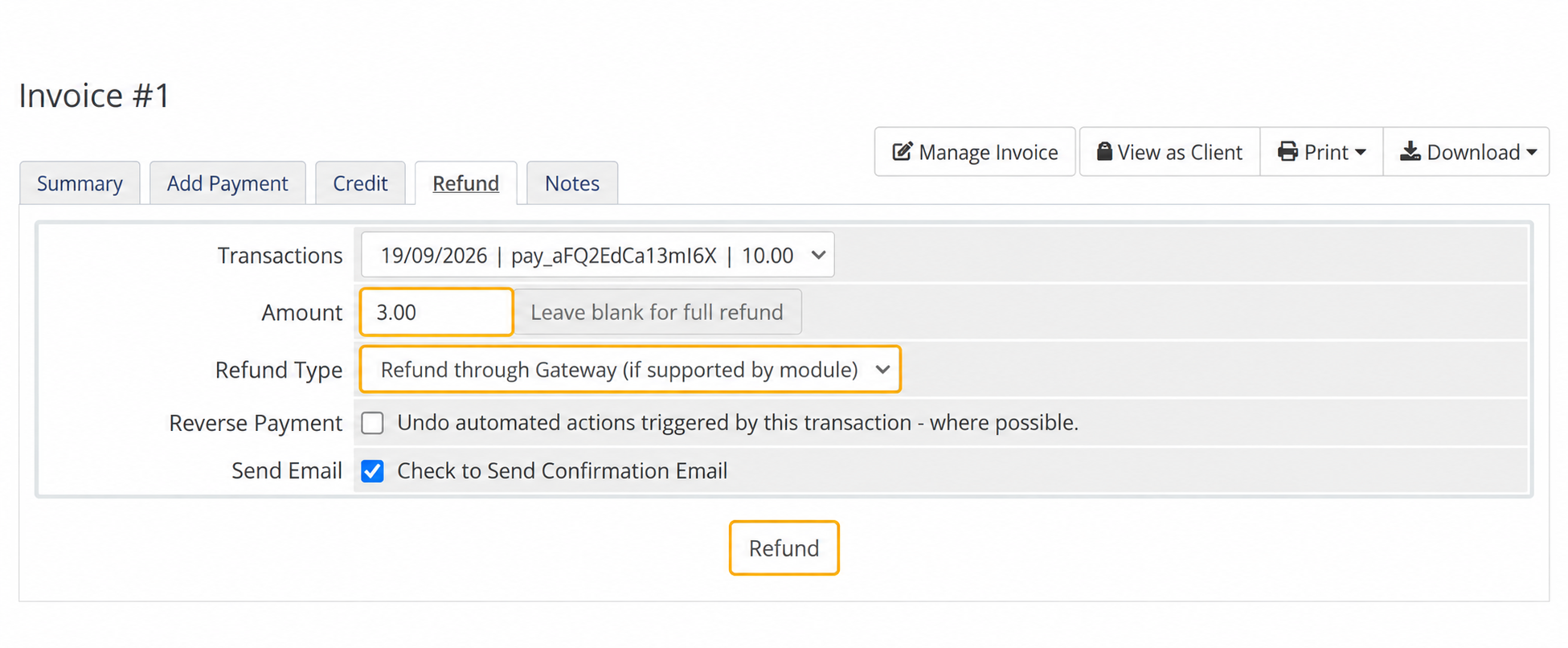
Sandbox: choose Refund through Gateway under Refund Type, enter the partial amount, then choose Refund.
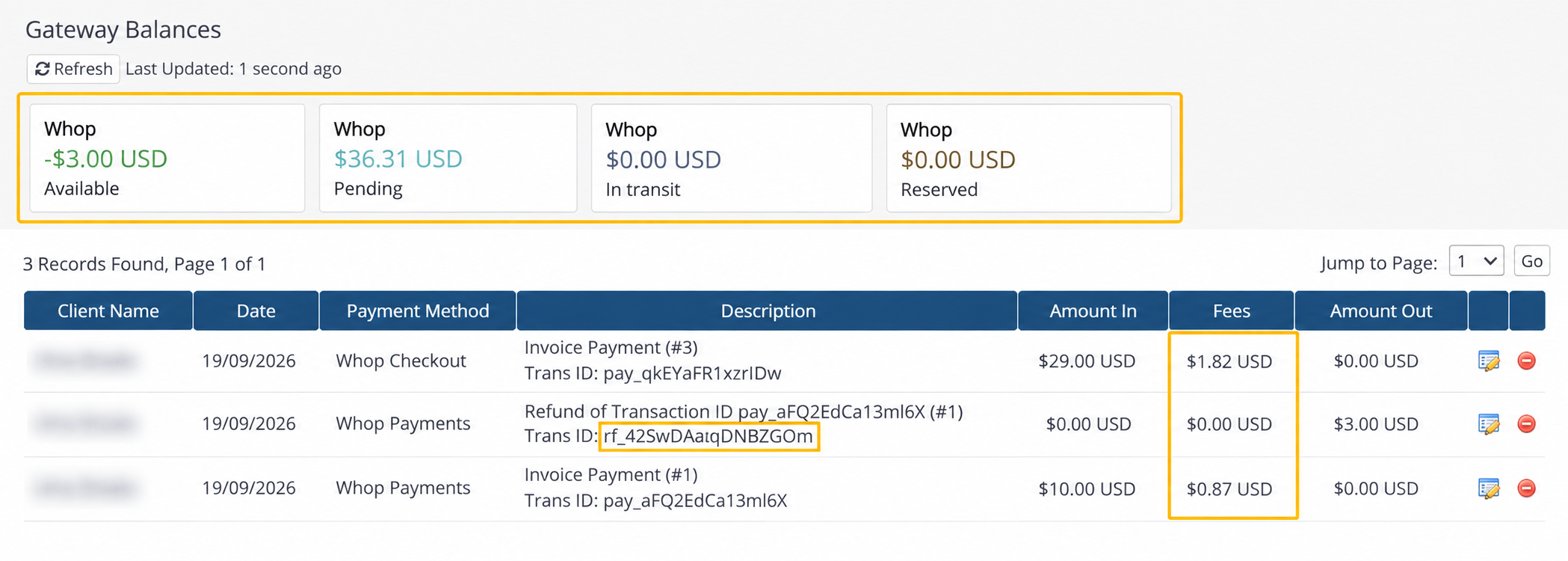
Sandbox: Whop balances appear above the native payment and refund transactions. The original payment retains its processing fee.
What happens
Refund tab: enter a full or partial amount
        |
WHMCS asks Whop to refund that amount
        |
Whop accepts -> WHMCS records the refund (rf_...)
A refund that starts the other way, inside Whop, follows the same shape in reverse:
Refund made in the Whop dashboard
        |
Whop sends a webhook (a message Whop's servers send WHMCS automatically)
        |
WHMCS records the refund the moment that webhook arrives
        |
If that attempt is interrupted, WHMCS's cron (its own scheduled task, running every five minutes) finishes the job
Either way, a refund is recorded as its own transaction linked to the original payment. The original pay_ transaction is never changed or removed.
What to expect
Accepted is not the same as completed. WHMCS records a refund the moment Whop accepts the request, even though some payment methods take longer to actually finish moving the money. This keeps your invoice accurate immediately instead of leaving it in limbo.
A later failure does not undo the WHMCS record. If Whop reports back that the refund failed or was canceled after WHMCS already recorded it, the transaction stays exactly as it is. Staff receive the whop.refund.failed alert if you set up that Notifications rule, and someone then reconciles the record by hand using your normal WHMCS accounting tools.
An unclear result is not a reason to try again. If the browser times out or the result is unclear, do not click Refund a second time. Check the payment in Whop, then check the transaction in WHMCS, before doing anything else. While a refund on that payment is still pending, WHMCS also blocks any further refund request on the same payment until it finishes.
Refunds made in the Whop dashboard need nothing from you. WHMCS picks them up automatically and records them under the same rf_ reference Whop already gave that refund, linked to the original payment. There is nothing to click in WHMCS.
Local currency payments refund as a percentage, in the currency the buyer paid. When a Whop Checkout invoice uses local currency payments (a Whop Checkout setting that lets the buyer pay in their own currency while WHMCS still bills in the invoice currency, see Amounts, currencies, taxes and fees), a refund is worked out as a percentage of the original payment and sent in the currency the buyer actually paid. The percentage is applied to what the buyer originally paid, so the buyer gets back exactly that share of their own payment. Whop converts at the exchange rate of the moment of the refund, not the rate that applied when the customer paid, so the value of that refund in the invoice currency can land a little either side of the WHMCS figure. WHMCS itself never looks up an exchange rate; it only works out the percentage.
For example, a USD 4.00 invoice settles at USD 3.99 after Whop's own conversion, while the buyer actually paid EUR 3.50. An admin refunds USD 1.20 on the Refund tab, which is 30% of the original USD 4.00. WHMCS asks Whop for 30% of EUR 3.50, which is EUR 1.05, and records USD 1.20 against a new refund reference. Refunding the remaining USD 2.80 afterwards asks Whop for everything still refundable on that payment, and WHMCS records USD 2.80.
Whole-unit currencies only refund in full. A small group of currencies, called whole-unit currencies (see Amounts, currencies, taxes and fees), only ever charge whole numbers, and refund from WHMCS in one go rather than in parts. WHMCS will not send a partial refund request when the invoice is in one of these currencies, or when the buyer paid in one of them: "Only a full refund of the remaining payment is available through WHMCS for this currency. Refresh the payment and refund the full remaining balance." Refund the full remaining amount instead.
Whop's own automatic refund rules can act before you do. Whop's refund policy in its own dashboard can refund a Resolution Center case automatically, below a threshold you set there, with no WHMCS action at all. That refund still syncs back to WHMCS the same way as any other. Set those thresholds in Whop, since the decision happens before anyone in WHMCS sees the case. See Disputes and staff alerts for how Resolution Center cases reach WHMCS.
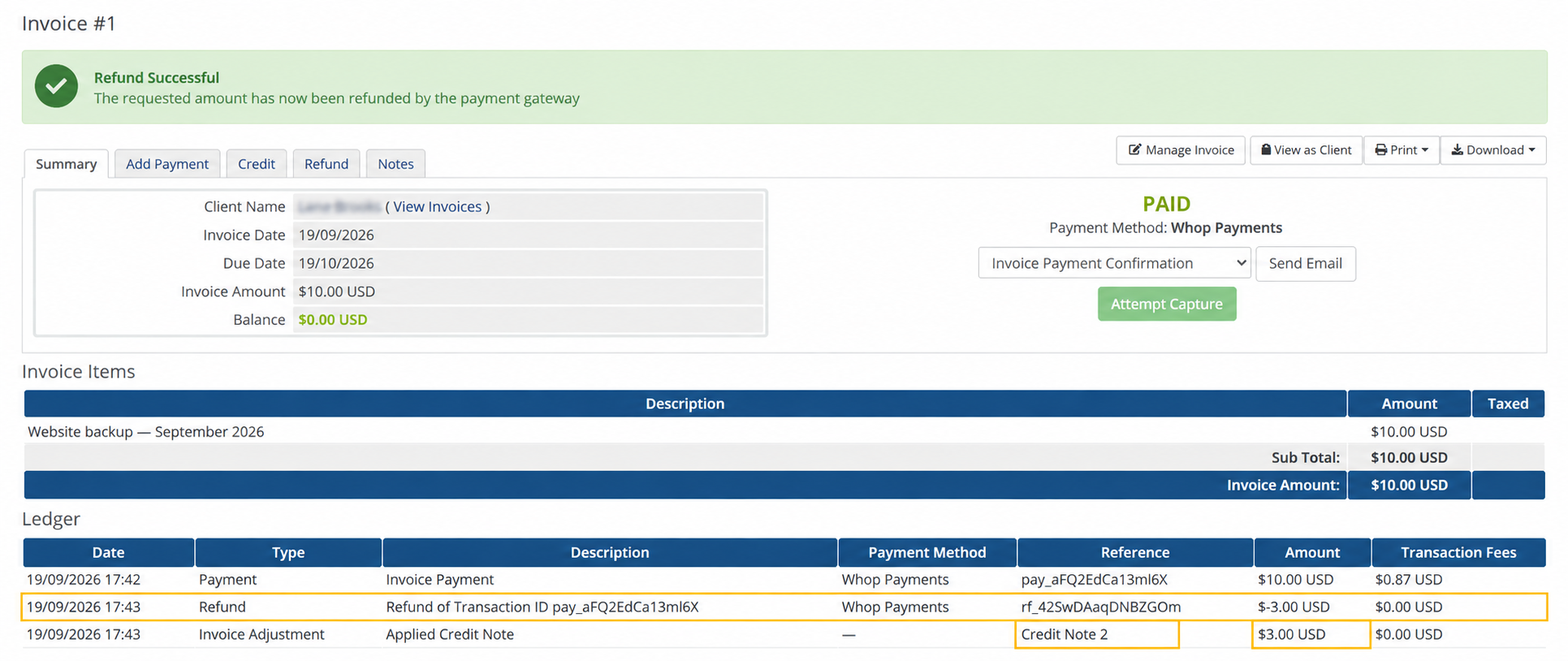
Sandbox, WHMCS 9: the USD 3.00 partial refund has its own rf_ reference and native credit-note adjustment. The invoice remains Paid with a zero balance.
Settings involved
No setting on the Whop Payments or Whop Checkout panel changes how refunds work. Two related settings live elsewhere:
- Whop's own refund policy and automatic refund thresholds, set in the Whop dashboard.
- The WHMCS Notifications rule for a failed refund, covered in Disputes and staff alerts.
See the full list on Settings reference.
Related: Amounts, currencies, taxes and fees, Disputes and staff alerts, Troubleshooting.
Updated 16 days ago